Are you going to use Dolphin instead of playing the game through one of the PC ports like Dusklight?
In that case, follow this setup guide instead!
Setup Guide for use in the PC Ports (Dusklight or Courage Reborn):
Step 1. Download and install the PC port of your liking (Dusklight or Courage Reborn).
Step 2. Download the latest version of the TP 4K texture pack for Dusklight.
Step 3. Navigate to the texture_replacements directory inside of the Dusklight / Courage Reborn main directory.
The paths for this location is different on different platforms.
See the following locations for Dusklight:
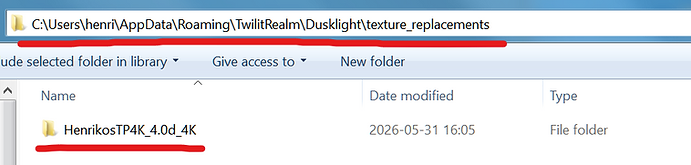
If you're on Windows: %APPDATA%\TwilitRealm\Dusklight\texture_replacements\
If you're on macOS: ~/Library/Application Support/TwilitRealm/Dusklight/texture_replacements/
If you're on Linux: ~/.local/share/TwilitRealm/Dusklight/texture_replacements/
If you're on Steam Deck: Same as Linux
If you're on Android: /sdcard/Android/data/dev.twilitrealm.dusk/files/Texture_Replacement/
If you're on iOS: (Unsupported as of yet)
The folder structure should look something like the following (on Windows as an example);
Step 3a (Optional). Download the optional Xbox + Playstation 4K UI Layout Addon and install it in the same way as the texture pack in Step 3. This addon replaces the original UI with icons matching either Playstation or Xbox controller layouts.
Step 4. Start the game in Dusklight / Courage Reborn and check that "Use Texture Pack" is enabled in the Settings > Video tab.
Step 5. That's all, it should work! You know it's loading the texture pack if it says "4K" on the game's title screen when the logo appears.
NO GAME ROM OR GAME FILES ARE INCLUDED WITH THIS TEXTURE PACK.
SHARING GAME ROMS IS PIRACY AND IS ILLEGAL. DO NOT ASK FOR THEM HERE OR ON DISCORD, OR YOU WILL BE MUTED.
How do I get the game rom?
No game files are distributed with this texture pack, since that would be illegal. You need to get the game .iso yourself. The legal way is to dump the game yourself from your own GameCube or Wii console.
Updating from an older version is super simple:
Just delete the old "GZ2" folder from texture-replacements directory and replace it with the new one from the latest version you want to update to. The latest version always includes all changes and additions from prior updates, so it's always best to just delete the old version and replace it with a clean install of the latest version of the texture pack. Once this is done it should work straight away!
This method also doesn't touch any of your save data.
If you encounter any issues with the texture pack please post about them on Discord!